# Jak Hrát s Kamarády?

> <span style="font-family: 'DejaVu Sans'; font-size: 11pt; color: rgb(0, 0, 0);">**Na to aby jsi hrál s kamarády jsou 2 způsoby.**</span><span style="font-family: 'DejaVu Sans'; font-size: 11pt; color: rgb(0, 0, 0);"> </span>

### **1. Pomocí pozvánky**

#### Jak to Funguje:

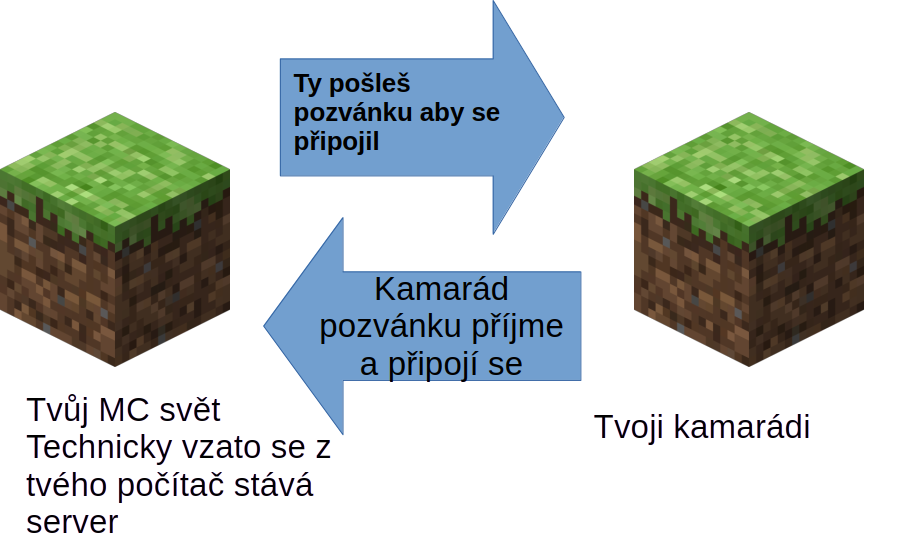
- - <span style="font-family: 'DejaVu Sans'; font-size: 11pt; color: #000000; mso-style-textfill-fill-color: #000000;">Když hraješ Minecraft ve svém světě a pozveš svého kamaráda. </span>
    - <span style="font-family: 'DejaVu Sans'; font-size: 11pt; color: #000000; mso-style-textfill-fill-color: #000000;">Když se</span><span style="font-family: 'DejaVu Sans'; font-size: 11pt; color: #000000; mso-style-textfill-fill-color: #000000;"> odpojíš ze světa kamarád se také odpojí ze světa </span><span style="font-family: 'DejaVu Sans'; font-size: 11pt; color: #000000; mso-style-textfill-fill-color: #000000;">.</span><span style="font-family: 'DejaVu Sans'; font-size: 11pt; color: #000000; mso-style-textfill-fill-color: #000000;"> </span><span style="font-family: 'DejaVu Sans'; font-size: 11pt; color: #000000; mso-style-textfill-fill-color: #000000;">![](https://mcinfo.squidnose.cz/uploads/images/gallery/2026-01/embedded-image-mitiv4on.png)</span>

#### Jak to zprovoznit na Bedrocku

- <span style="font-family: 'DejaVu Sans'; font-size: 11pt; color: #000000; mso-style-textfill-fill-color: #000000;">V první řadě nastav v nastavení světu že můžeš hrát s Kamarádama</span><span style="font-family: 'DejaVu Sans'; font-size: 11pt; color: #000000; mso-style-textfill-fill-color: #000000;">.</span>
- <span style="font-family: 'DejaVu Sans'; font-size: 11pt; color: #000000; mso-style-textfill-fill-color: #000000;">Následně pošli pozvánku o kamarádství tvému kamarádovy.</span>
- <span style="font-family: 'DejaVu Sans'; font-size: 11pt; color: #000000; mso-style-textfill-fill-color: #000000;">Spusť svět a pozvi kamaráda do světa.</span>
- <span style="font-family: 'DejaVu Sans'; font-size: 11pt; color: #000000; mso-style-textfill-fill-color: #000000;">Více informací na </span>[<span style="font-family: 'DejaVu Sans'; font-size: 11pt; color: #0563c1; mso-style-textfill-fill-color: #0563c1;"><u>https://help.minecraft.net/hc/en-us/articles/24122512131213-How-Do-I-Join-a-Friend-s-Online-World-in-Minecraft-Bedrock-Edition</u></span>](https://help.minecraft.net/hc/en-us/articles/24122512131213-How-Do-I-Join-a-Friend-s-Online-World-in-Minecraft-Bedrock-Edition "https://help.minecraft.net/hc/en-us/articles/24122512131213-How-Do-I-Join-a-Friend-s-Online-World-in-Minecraft-Bedrock-Edition")<span style="font-family: 'DejaVu Sans'; font-size: 11pt; color: #000000; mso-style-textfill-fill-color: #000000;"> </span>
- <span style="font-family: 'DejaVu Sans'; font-size: 11pt; color: #000000; mso-style-textfill-fill-color: #000000;">Instruktivní video: </span>[<span style="font-family: 'DejaVu Sans'; font-size: 11pt; color: #0563c1; mso-style-textfill-fill-color: #0563c1;"><u>https://www.youtube.com/watch?v=Xfw7us3UWbU</u></span>](https://www.youtube.com/watch?v=Xfw7us3UWbU)<span style="font-family: 'DejaVu Sans'; font-size: 11pt; color: #000000; mso-style-textfill-fill-color: #000000;"> </span>

#### Jak to zprovoznit na Javě 

- <span style="font-family: 'DejaVu Sans'; font-size: 11pt; color: #000000; mso-style-textfill-fill-color: #000000;">Pro hraní mezi sebou se musí použít mód **Essential**.</span>
- <span style="font-family: 'DejaVu Sans'; font-size: 11pt; color: #000000; mso-style-textfill-fill-color: #000000;">Podobně jako v Bedrocku se připojuje pomocí jmenovky.</span>
- <span style="font-family: 'DejaVu Sans'; font-size: 11pt; color: #000000; mso-style-textfill-fill-color: #000000;">Essential si musí stáhnout oba dva lidi kteří chtějí hrát spolu.</span>
- <span style="font-family: 'DejaVu Sans'; font-size: 11pt; color: #000000; mso-style-textfill-fill-color: #000000;">Oba dva hráči musí mít stejnou verzi Minecraftu. </span>
- <span style="font-family: 'DejaVu Sans'; font-size: 11pt; color: #000000; mso-style-textfill-fill-color: #000000;">Pro módy všeobecně, doporučuji použít </span><span style="font-family: 'DejaVu Sans'; font-size: 11pt; color: #000000; mso-style-textfill-fill-color: #000000;">**Prismlauncher**</span><span style="font-family: 'DejaVu Sans'; font-size: 11pt; color: #000000; mso-style-textfill-fill-color: #000000;">. Je to jednoduchý způsob jak přidávat módy do minecraftu. </span>
    - <span style="font-family: 'DejaVu Sans'; font-size: 11pt; color: #000000; mso-style-textfill-fill-color: #000000;">Nainstalovat </span><span style="font-family: 'DejaVu Sans'; font-size: 11pt; color: #000000; mso-style-textfill-fill-color: #000000;">**PrismLauncher** </span><span style="font-family: 'DejaVu Sans'; font-size: 11pt; color: #000000; mso-style-textfill-fill-color: #000000;">odsud: </span>[<span style="font-family: 'DejaVu Sans'; font-size: 11pt; color: #0563c1; mso-style-textfill-fill-color: #0563c1;"><u>https://prismlauncher.org/download/</u></span>](https://prismlauncher.org/download/ "https://prismlauncher.org/download/")<span style="font-family: 'DejaVu Sans'; font-size: 11pt; color: #000000; mso-style-textfill-fill-color: #000000;"> </span>
    - <span style="font-family: 'DejaVu Sans'; font-size: 11pt; color: #000000; mso-style-textfill-fill-color: #000000;">Přihlásit se na Microsoft účet do </span><span style="font-family: 'DejaVu Sans'; font-size: 11pt; color: #000000; mso-style-textfill-fill-color: #000000;">**PrismLauncher**</span><span style="font-family: 'DejaVu Sans'; font-size: 11pt; color: #000000; mso-style-textfill-fill-color: #000000;">.(Musíš mít placený účet)</span>
    - <span style="font-family: 'DejaVu Sans'; font-size: 11pt; color: #000000; mso-style-textfill-fill-color: #000000;">Nainstalovat </span><span style="font-family: 'DejaVu Sans'; font-size: 11pt; color: #000000; mso-style-textfill-fill-color: #000000;">Javu</span><span style="font-family: 'DejaVu Sans'; font-size: 11pt; color: #000000; mso-style-textfill-fill-color: #000000;"> </span><span style="font-family: 'DejaVu Sans'; font-size: 11pt; color: #000000; mso-style-textfill-fill-color: #000000;">tady je tutoriál: </span>[<span style="font-family: 'DejaVu Sans'; font-size: 11pt; color: #0563c1; mso-style-textfill-fill-color: #0563c1;"><u>https://prismlauncher.org/wiki/getting-started/installing-java/</u></span>](https://prismlauncher.org/wiki/getting-started/installing-java/ "https://prismlauncher.org/wiki/getting-started/installing-java/")<span style="font-family: 'DejaVu Sans'; font-size: 11pt; color: #000000; mso-style-textfill-fill-color: #000000;"> </span>
    - <span style="font-family: 'DejaVu Sans'; font-size: 11pt; color: #000000; mso-style-textfill-fill-color: #000000;">Přidat nový instance a v kolonce módy přidat mód essential mod.</span>
    - <span style="font-family: 'DejaVu Sans'; font-size: 11pt; color: #000000; mso-style-textfill-fill-color: #000000;">Spustit hru a přidat přátelé v sekci sociál.</span>
- <span style="font-family: 'DejaVu Sans'; font-size: 11pt; color: #000000; mso-style-textfill-fill-color: #000000;">Video tutoriál: </span>
    - <span style="font-family: 'DejaVu Sans'; font-size: 11pt; color: #000000; mso-style-textfill-fill-color: #000000;">Tady je video tutoriál pro jednoduší instalaci ale pouze pro MS Windows Hráče: </span>[<span style="font-family: 'DejaVu Sans'; font-size: 11pt; color: #0563c1; mso-style-textfill-fill-color: #0563c1;"><u>https://www.youtube.com/watch?v=NyAojWjxi1s</u></span>](https://www.youtube.com/watch?v=NyAojWjxi1s)<span style="font-family: 'DejaVu Sans'; font-size: 11pt; color: #000000; mso-style-textfill-fill-color: #000000;"> </span>

### **2. Pomocí serveru**

#### Jak to Funguje:

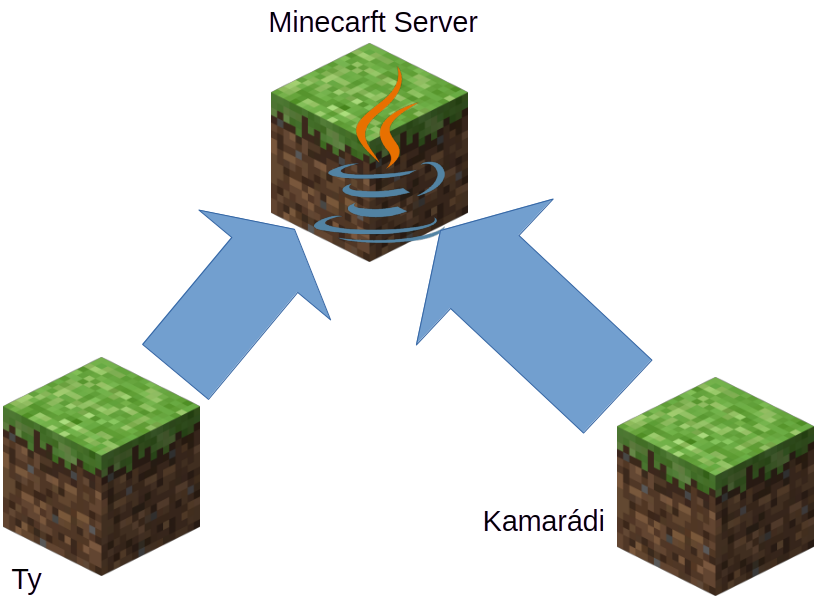
- <span style="font-family: 'DejaVu Sans'; font-size: 11pt; color: #000000; mso-style-textfill-fill-color: #000000;">Funguje to tak že ty a další se připojují na jeden Minecraft server. </span>
- <span style="font-family: 'DejaVu Sans'; font-size: 11pt; color: #000000; mso-style-textfill-fill-color: #000000;">Výhoda je ta, že server můžeš mít spuštěný furt a nezávisí na tvém PC.</span><span style="font-family: 'DejaVu Sans'; font-size: 11pt; color: #000000; mso-style-textfill-fill-color: #000000;">![](https://mcinfo.squidnose.cz/uploads/images/gallery/2026-01/embedded-image-sbnw4hpa.png)</span>
- <span style="font-family: 'DejaVu Sans'; font-size: 11pt; color: #000000; mso-style-textfill-fill-color: #000000;">Nevýhoda je že se složitěji zprovozňuje ale zase na druhou stranu se toho víc naučíš. </span>
- <span style="font-family: 'DejaVu Sans'; font-size: 11pt; color: #000000; mso-style-textfill-fill-color: #000000;">Další výhoda je, možnost udělat server na kterým mohou hrát </span><span style="font-family: 'DejaVu Sans'; font-size: 11pt; color: #000000; mso-style-textfill-fill-color: #000000;">**Java a Bedrock** </span><span style="font-family: 'DejaVu Sans'; font-size: 11pt; color: #000000; mso-style-textfill-fill-color: #000000;">Hráči. Což na pozvánkov</span><span style="font-family: 'DejaVu Sans'; font-size: 11pt; color: #000000; mso-style-textfill-fill-color: #000000;">é metodě nejde.</span>

#### Jak to Zprovoznit:

- <span style="font-family: 'DejaVu Sans'; font-size: 11pt; color: #000000; mso-style-textfill-fill-color: #000000;">Vyber si:</span>
    - <span style="font-family: 'DejaVu Sans'; font-size: 11pt; color: #000000; mso-style-textfill-fill-color: #000000;">Pořídíš si Hostování serveru. </span>
    - <span style="font-family: 'DejaVu Sans'; font-size: 11pt; color: #000000; mso-style-textfill-fill-color: #000000;">Nebo si z počítače uděláš server který ti běží doma. </span>
- <span style="font-family: 'DejaVu Sans'; font-size: 11pt; color: #000000; mso-style-textfill-fill-color: #000000;">Tady je odkaz toho jak například vypadá ovládání od hostovatelé: </span>[<span style="font-family: 'DejaVu Sans'; font-size: 11pt; color: #0563c1; mso-style-textfill-fill-color: #0563c1;"><u>https://youtu.be/815GdxPq\_P0?si=wepzzN3DIgaDdng2</u></span>](https://youtu.be/815GdxPq_P0?si=wepzzN3DIgaDdng2)<span style="font-family: 'DejaVu Sans'; font-size: 11pt; color: #000000; mso-style-textfill-fill-color: #000000;"> </span>
- <span style="font-family: 'DejaVu Sans'; font-size: 11pt; color: #000000; mso-style-textfill-fill-color: #000000;">Když chceš z počítače udělat server, tady je na to skvělé video: </span>[<span style="font-family: 'DejaVu Sans'; font-size: 11pt; color: #0563c1; mso-style-textfill-fill-color: #0563c1;"><u>https://youtu.be/bAGTwBURBXc?si=FKxMg2qv2tTVGw1u</u></span>](https://youtu.be/bAGTwBURBXc?si=FKxMg2qv2tTVGw1u "https://youtu.be/bAGTwBURBXc?si=FKxMg2qv2tTVGw1u")